Bing AI Mode shows no results error for common queries
Bing AI Mode returned a ‘There are no results for this question’ error for a simple query like ‘cushions for a sofa,’ something Google AI Mode and ChatGPT did not do.
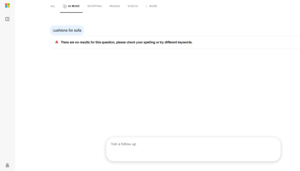
Bing AI Mode is showing an error for some common queries. When I searched for “cushions for a sofa,” Bing AI Mode returned this message: “There are no results for this question. Please check your spelling or try a different keyword.”
Here is a screenshot of this.
I don’t think this happens on other AI search tools. Google AI Mode and ChatGPT will still give an answer even if a query has a spelling mistake. In this case the query was spelled correctly, and Bing still showed the error. This could be a bug, but it is not a good experience for users.
Bing is showing a new Copilot Visual Search option when users hover over images, alongside the usual search using image option. Clicking it opens an “Ask anything about this image” follow-up box.
Bing AI Overview is displaying additional source links directly below its image carousel, alongside the existing reference panel on the right. Both locations show the same website references and URLs.
Start the conversation by posting the first comment



Start the conversation by posting the first comment