

Google has confirmed that Chrome will show an AI chat button in the address bar when users set a supported third-party search engine as their default, giving them direct access to its AI chat experience.
Chrome supports alternative search engines, including Microsoft Bing, DuckDuckGo, and Brave Search. Google hasn’t specified which providers will get the new button.
“To ensure all Chrome users can quickly get AI-powered answers to their questions, regardless of their default search engine, the Omnibox now displays an AI chat button for supported third-party search engines. This provides a seamless, one-click experience to access their preferred search engine’s AI chat capabilities,” Google explained.
Chrome already supports an AI Mode button in the address bar when Google is the default search engine. The latest change extends this option to supported third-party search engines, letting users access their preferred provider’s AI chat directly from Chrome.
Google has been testing an AI Mode ntry point for third-party search engines in Chrome’s address bar and has also expanded testing to Android. The company has now confirmed the feature in its Chrome Enterprise release notes and provided rollout timelines for desktop and mobile.
The feature will roll out gradually with Chrome 151 on Windows, macOS, Linux, and ChromeOS. On Android, the rollout is planned for Chrome 157.
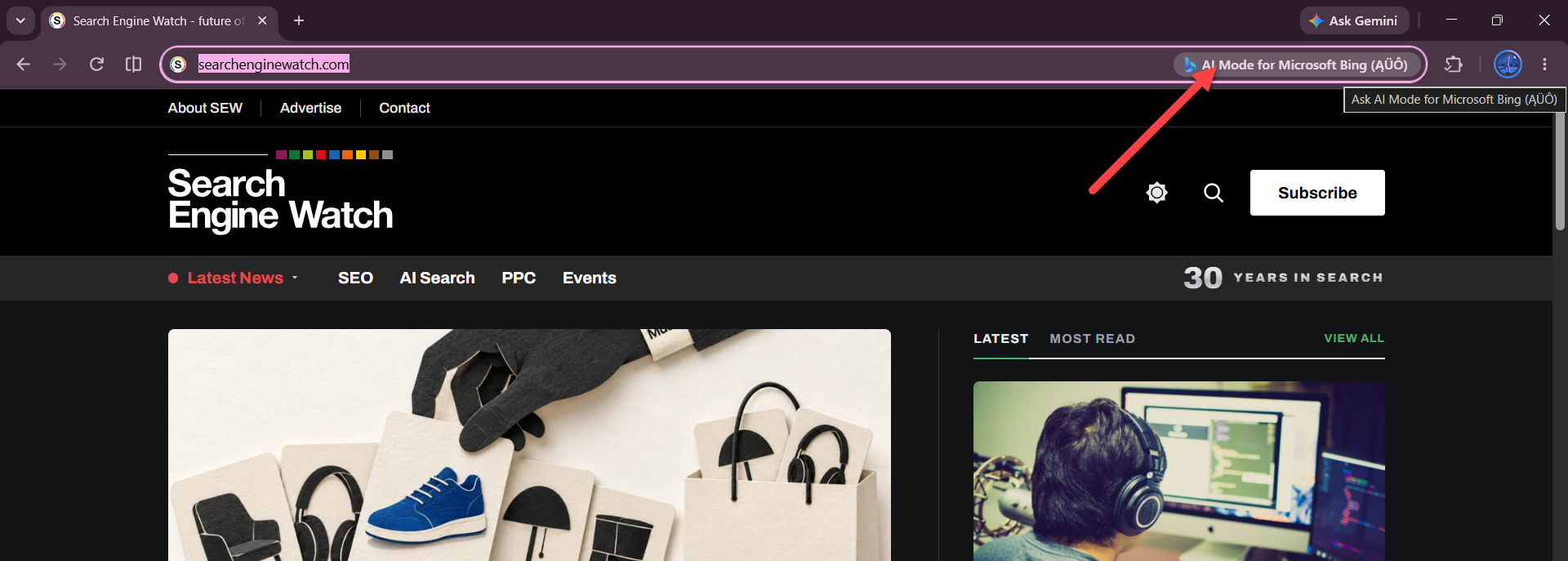
In our testing, Chrome displayed an “AI Mode for Microsoft Bing” button in the address bar while Bing served as the default search engine. However, clicking the button took us to a Google Search results page with a query about opening Bing’s AI Mode landing page instead of opening Bing’s AI chat. The button appeared in Chrome, but it didn’t take us to the expected destination.
Google hasn’t named the third-party search engines that will support the feature. The rollout will reveal which providers users can access through Chrome’s new AI chat button.
Start the conversation by posting the first comment